Protect and optimize your battery with the Smarter Battery
Anybody who has ever used a laptop will probably agree that damaging your battery is a massive pain in the neck. Not only will you end up being unable to use your laptop without the battery, thereby defeating the purpose of a laptop itself, you might also damage your system so much that it becomes completely unusable. In order to prevent this from happening, it’s advisable that users take special precautions to protect their batteries. While most batteries have built-in tools to do this, a specialized software like the Smarter Battery by Microsys Com wouldn’t hurt.
Top Recommended Alternative

Analysis and Information
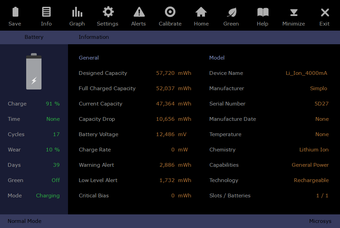
Smarter Battery is a utility tool for laptops and notebooks that allow users to calibrate, monitor, optimize and protect batteries to make batteries last longer and make them more effective. To this end, the Smarter Battery has a lot of features that help to maintain a battery’s life and efficacy. Probably the most important is the Information feature. As its name suggests, the Smarter Battery analyzes and displays information about the battery in use. This will help users determine the capacity of their batteries. The information displayed includes the designed capacity, full charged capacity, battery voltage, charge rate, and more. In another tab on the software, you’ll also be able to see the capacity evolution of the battery in graph form.
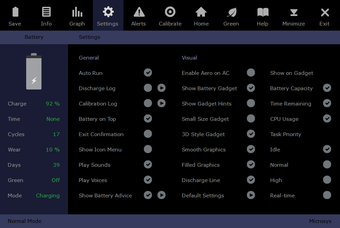
Users can also customize the settings of the software. They can choose whether the program should autorun, show button hints, show an icon menu, and more. They can also choose whether or not to play sounds and voices when using the program which is a helpful option because the sounds tend to be very annoying.
Green Mode and Calibration
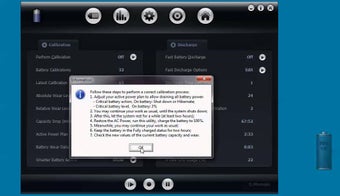
The software also allows users to log the calibration details of their batteries. While it’s a shame that there are no options to automatically calibrate batteries, it’s a good thing that you can go back to the calibration details using this program. The Smarter Battery also comes with a Green Mode that automatically shuts down or changes some setting in order to prevent even more battery usage. With the Green Mode, you’ll be conserving even more power and energy in order to allow more use time.
Performance and Interface
The Smarter Battery is designed to use up as little resource in your machine as possible. It’s entirely likely that you’ll end up not knowing it’s even running at all. It causes no significant slow down in the user's’ system and it rarely lags and crashes. All of these efficient features are displayed in a stylish and intuitive interface. The design is very pleasing to the eye and the icons for each tab are easy to understand and uncomplicated.
A Must-Have for Any Laptop
Even if you have the best laptop ever, as the years go by, its battery will experience some wearing down. With the Smarter Battery, you’ll be able to monitor the performance and life of your battery so that you’ll be spared the frustration when it eventually breaks. Despite the price, it’s a software that’s worth checking out.